
Tag&Rename3.9.15 - Download
You'll be able to download in few seconds.
Publisher Description
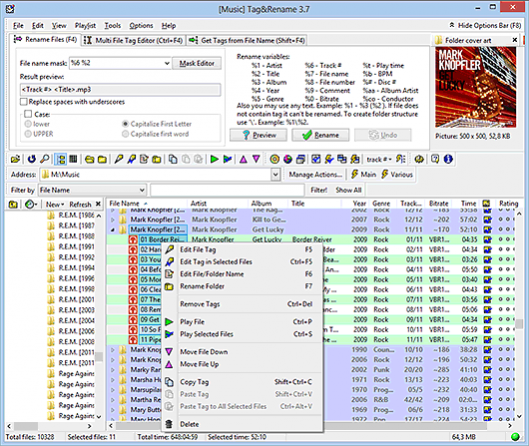
Tag&Rename is a music organizer that easily handles all popular digital audio formats. Keep your music collection organized with Tag&Rename because it has full support for: mp3 (ID3v1, ID3v2.2, ID3v2.3 and ID3v2.4 tags), Windows Media wma, asf and wmv files, Ogg Vorbis, Flac, Opus, Speex (vorbis comments), Apple iTunes aac m4a/mp4/m4p/m4b/m4v files, MusePack mpc (APEv1, APEv2 and ID3v1 tags), most popular lossless codecs including monkey's audio, wav pack, optim frog, flac, tta, wav and aiff. Tag&Rename supports many additional tag fields including lyrics, cover art, rating, mood, disc #, classical music fields (Composer, Conductor, etc.), file related URLs and so on. With Tag&Rename, you can automatically fix and complete file tags using online freedb database, load titles and cover art from Amazon or Discogs servers, get tags data from file names and its folders structures, rename your music files and folders according to its tag information in a batch, resize and convert cover art inside tags. Tag&Rename include full Unicode support and support Windows from XP to 10.
About Tag&Rename
This program is available in English, ChineseSimplified, Czech, Dutch, Estonian, French, German, Hungarian, Indonesian, Italian, Kirundi, Polish, Portuguese, Russian, Spanish. It was last updated on 29 September, 2026. Tag&Rename is compatible with the following operating systems: Windows, Windows-mobile.
The company that develops Tag&Rename is Softpointer Inc. The latest version released by its developer is 3.9.15.
The download we have available for Tag&Rename has a file size of 6.3 MB. Just click the green Download button above to start the downloading process. The program is listed on our website since 2018-06-14 and was downloaded 0 times. We have already checked if the download link is safe, however for your own protection we recommend that you scan the downloaded software with your antivirus. Your antivirus may detect the Tag&Rename as malware if the download link is broken.
How to install Tag&Rename on your Windows device:
- Click on the Download button on our website. This will start the download from the website of the developer.
- Once the Tag&Rename is downloaded click on it to start the setup process (assuming you are on a desktop computer).
- When the installation is finished you should be able to see and run the program.
Program Details
General
System requirements
Download information
Pricing
Version History
version 3.9.15
posted on 2018-06-14
minor fixes
version 3.9.14
posted on 2017-06-16
now, if Tag&Rename can't rename or edit tag in file, it is show name of the application that lock this file
improved Discogs search
fixed bug in aiff support
fixed bug in wav support
fixed bug in mp4 support
fixed bug in cover art resizing while saving tag
minor fixes
version 3.9.12
posted on 2017-01-26
added support for new iTunes Grouping ID3v2 tag frame
Czech translation updated
fixed bug in mp4 support
minor fixes
version 3.3.5
posted on 2007-03-22
Tag&Rename "Filters" now use MS-DOS wild cards
now you can change files rating from files list with one mouse click
added "Rating" field in "Filter" function
added "Channels" option into "Export Wizard"
fixed not worked web import in some systems
Disclaimer
External Download
We do not host Tag&Rename on our servers. We did not scan it for viruses, adware, spyware or other type of malware. This app is hosted by the software publisher and passed their terms and conditions to be listed there. We recommend caution when installing it.
The external download link for Tag&Rename is provided to you by apps112.com without any warranties, representations or guarantees of any kind, so access it at your own risk.
If you have questions regarding this particular app contact the publisher directly. For questions about the functionalities of apps112.com contact us.
